
Use case · Finance & accounting
A WIP report that builds itself every night.
Month-end WIP usually means a controller pulling Sage, Procore, and a pile of spreadsheets into one workbook, then defending every number in the meeting. Projexion rebuilds it nightly from the source systems, so the WIP is current the day you need it.
The financial briefing
Signals cleaned up from Procore and Sage into one set of numbers, checked every morning.
Needs attention
$340K in change orders
Waiting on approval, 5 orders aged 5+ days, 2 over $100K.
Work them before they age into disputes
Worth watching
Fee erosion
Forecasted fee dropping on 2 jobs, below contractual margin.
Surface in the next financial review
Momentum
4 invoices ready to release
$2.1M, all approvals complete.
Release to improve the cash position
What's on the dashboard
Examples from the dashboards contractors run in Projexion today.
Contract & fee
Revised contract value, contractual vs projected fee %, and forecasted profit, job by job.
Earned vs billed
% complete next to % billed to date, so over- and under-billing jumps out.
ECAC
Estimated cost at completion against the revised budget, with the over/under total.
Portfolio fee trends
How the portfolio's projected fee moved month over month.
WIP per project
The same WIP schedule cut to a single job for the PM review.
Backlog & forecast
Remaining contract value and when it burns, for the board and the bank.
Built from the source, every night
The WIP schedule, without the workbook
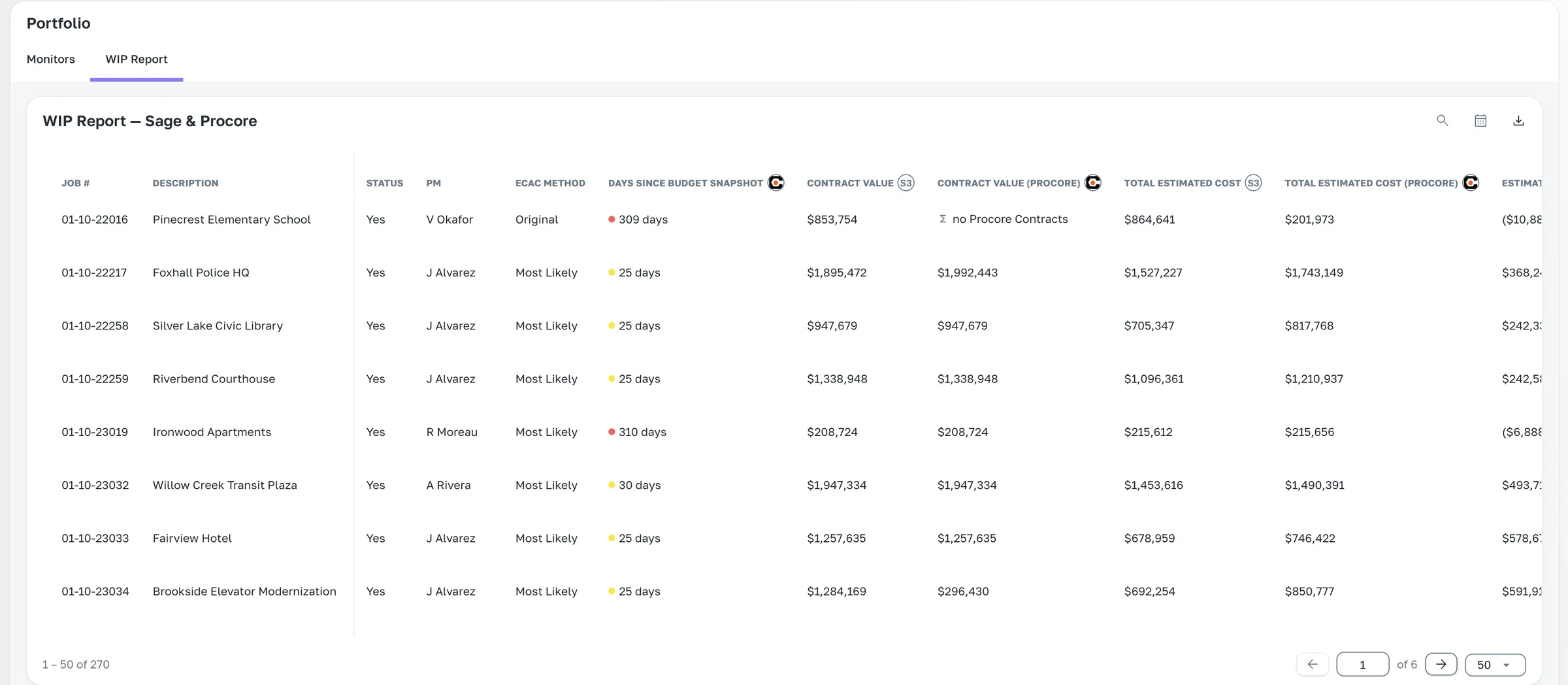
Projexion reads job cost from Sage, commitments and change orders from Procore, and reconciles them into one record per job. The WIP schedule is a dashboard, so it filters by office, PM, or project type, and every number drills down to the line items behind it.
Rebuilt nightly, no month-end scramble
Drill from fee fade to the cost code that caused it
Freeze it as of month-end with the time machine
The features behind it
Integrations & connectors
Procore, Sage 300 CRE, Autodesk, P6/MSP, Excel, hooked up once, synced nightly.
Explore →
Full calculation editor
Build any metric step by step, no SQL. Define it once, then it applies everywhere.
Explore →
History & time machine
Imports keep dated snapshots, so you can open any dashboard the way it looked on January 1st.
Explore →
Automatic distributions
The Monday report sends itself, with live numbers, to exactly who should see them.
Explore →
Exports
Any table or score card to Excel, CSV, or PDF, from the app, IRIS, or Claude.
Explore →
Argus — morning briefing
Today's risks, already triaged. Which projects, why, and what to do next.
Explore →
Walk into the WIP meeting already done.
See your WIP rebuilt from your own Sage and Procore data.